If email is displayed wrong, please, click here
Torry Newsletter - October, 2026
Dear Madam, Dear Sir,
we would like to inform you shortly about some noteworthy events and news in Delphi world. Enjoy the reading.
A small peculiarity in Devart DAC solutions
Being noticed that a new version of IBDAC and SDAC components are available, I decided to perform the update
for my actual Delphi 13.1 version:
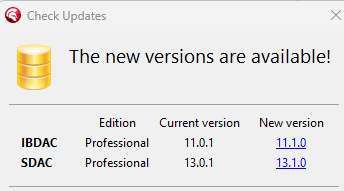
Then, after launching Delphi an error message appeared showing an error - for running new versions
the latest version of Delphi (i.e. 13.2) must be installed. Because I was not aware of a such behavior in past,
I created a support case and sent it to colleagues in Devart service departement. The answer is slightly
suprising but here is the whole conversation:
ME:
Until now, all IBDAC version were backward compatible with existing Delphi versions - for instance,
version 11.0 supported Delphi 13.1 but didn't require it, worked in Delphi 13.0 as well.
Yesterday I downloaded the latest IBDAC version 11.1 (having still Delphi 13.1) and have been
very embarrased that the installation is impossible and Delphi 13.2 is required. It would mean
that all fixes and improvements are available only for the newest Delphi version, wouldn't it?

DEVART:
Indeed, all recent products in our DAC product line require RAD Studio 13.2. The reason for this
is purely technical and is related to the way RAD Studio versions are handled by Embarcadero.
Within the same RAD Studio generation, such as version 13, we can release only one version of
our components because Embarcadero does not allow different releases of the same RAD Studio
generation to be installed in the same environment, for example, RAD Studio 13.1 and 13.2.
In addition, packages compiled with RAD Studio 13.2 cannot be used with RAD Studio 13 or RAD Studio
13.1. This is not a limitation imposed by our products, but rather a restriction
of the RAD Studio platform.
Because of this, we have to choose the latest release within the generation and provide support
for RAD Studio 13.2.
We understand that this may be inconvenient if you are using an earlier release of RAD Studio 13,
but unfortunately, this compatibility limitation is outside our control.
Quick and comfortable way for saving and restoring user preferences in apps
You probably know the case: Almost all dialogs in your desktop app contain a lot of controls and properties
and some of them need to be saved and restored when the dialog is showing or hiding. Ways how to grapple
with this obtrusive task are different, however we'd like to mention the solution that we have been using
for more than decade - Property Saver suite from Rosinsky Software.
The main idea is very simple - there is TPropSaveFile component serving as a bridge between application
and an INI file. It is placed mostly on DataModule and communicates with the INI file specified
in an appropriate property (FileName).
In each dialog where you need to save and restore controls positions and states, you'll simply place
a TPropSaveMain component and specify which controls need to be included - you can determine,
for instance, State of Checkbox, selected item of Combobox or Text value of Edit.
In addition, you can use TGridPropSave too - it is a very powerful component
for saving and restoring grid properties (DBGrid, TMS grids) - columns, headers, fonts etc.
All the settings can be made through built-in wizard at design-time very easily.
Features described above are available without literally any line of code. But let's take a look
at the INI file structure. As you can see, particular parameters are organized in sections (in square
brackets):
[General]
DBPath=yamaco00/3070:C:\Temp\Sod.fdb
PtsPath=C:\DZdroje
IniPath=C:\DZdroje\Prp
AUTheslo=rfB1PyCcxTmM71w+iOtvDA==

This section is very handy for placing key application settings. However, Property Saver system automatically
saves and loads controls settings for each engaged form, for instance (an example of saved properties
of TMS AdvGrid column and Title settings):

[Form4ISZR.GLok.Column1]
ColTag=1002
ColWidth=96
ColVisible=1

[FormRnom.DBGrid1.Title]
FontCharset=238
FontColor=8388608
FontName=Tahoma
FontHeight=-11
FontSize=8
FontStyle=0

TPropSaveFile component provides one more useful function - for cases when you need to perform
an initial settings of your app. To preserve parameters in some sections of the INI file (as for General
section Above),  you can use EraseSectionExceptMask method (a following code erases the whole content
of INI file except section General and settings of Form4ISZR form):

PropSaveFile1.EraseSectionExceptMasks(['General','Form4ISZR*']);
Out of topic - Using BlackBerry hub as a powerful solution for your mobile office
Apology for something out of topic, but because I know that a general awareness of this mobile app
for Android is very poor, I consider mentioning it as an obligation.
I had been using Blackberry smartphones for many years and also created a couple of popular mobile apps
for Blackberry 10 operating system. The most fantastic solution of it was probably BlackBerry Hub.
You can imagine it as a message and notification centre where all e-mails, SMS messages, social media
notification or mobile banking messages are collected, seen, handled and viewed.
Unfortunately, Blackberry 10 OS disappeared and went to a silicon heaven, nevertheless BlackBerry Hub
is still here and offers almost all goodness of its BB10 predecessor.
Here are some noteworthy features of BlackBerry Hub: Quick handling with messages, filtering and sorting,
working with the attachements, own message stencils for a repetitive and quick anwers, highlighting
message sources with a higher priority, varied sounds for message groups, push delivery and many more.
BlackBerry Hub is available either completely free with ads, or as a paid app (approx. EUR 1/month).
I cannot imagine my daily routine without this tool and I think that this app is worth trying out at least.
Information for developers and vendors
Do you have an interesting component, utility or package that you'd like to promote?
Do you want to let the Torry community know about your activities, promos and discounts?
Are you looking for a programmer's job or hiring professionals?
For all these cases you can use publishing the appropriate information in our newsletter.
Those who already have any type of advertisement at Torry,
can publish information in the newsletter free of charge.
If you're not our advertisers yet and would like to publish your news in the newsletter,
please contact us at yamaco@yamaco.cz.
See you in October and have a great Indian summer season.
On behalf of Torry.net Team,
Karel Janeček
Co-Owner and CEO of YAMACO Software
