If email is displayed wrong, please, click here
Torry Newsletter - September, 2026
Dear Madam, Dear Sir,
we would like to inform you shortly about some noteworthy events and news in Delphi world. Enjoy the reading.
RAD Studio 13.2 Florence has been released
As you probably know, a new version 13.2 of RAD Studio and Delphi has been released
a few days ago. It would be vain to mention all its improvements, new features and changes, something
like carry coal to Newcastle. If you haven't an opportunity to see what's new yet, please click
here - an official Embarcadero page.
I skimmed over many available blogs and sources and let me emphasize two new features:
I consider two new VCL components, TTabView and TNavigationView, as very useful for enriching
Windows apps and giving them fresh and cool look.
But I was really surprised and delighted by adding a very tiny form editor improvement - I'm talking about
the new designer hints. Well, we have had a small text-based hint windows while moving the mouse cursor
over the components, where we can see a couple of properties, typically Left, Top, Size etc.
RAD Studio 13.2 brings a new fresh designer hint window with more useful information:
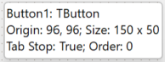
versus
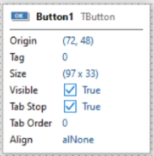
Source of these images is Mr. Marco Cantu's blog at blogs.embarcadero.com, thank you so much.
How to grapple with uploading and dowloading files to/from FTPS server easily?
Recently, we're solving a programmer's taks based on AES files exchange between superior and
subordinate units - municipal offices here in the Czech republic. Because of security reasons and restrictions,
we were not allowed to use either FTP (plain) or SFTP protocols so only one conceivable way was
to use FTPS protocol.
Having an active license of SecureBlackBox suite from nSoftware, the task could have been simplified
in many aspects. A special component named TEISimpleFTPSClient has been used, which provides all necessary
methods for uploading to FTPS (UploadFile), getting a list of files in a given directory (GetNameList),
dowloading selected files (DownloadFile) or deleting the unnecessary files (DeleteFile).
It is not my intention to describe all methods and imaginable scenarios of use TEISimpleFTPSClient. The most
important issue that we faced during creating our solution was to overcome a deep-rooted proposition that says
"FTPS protocol is dangerous". To be frank, it's not true - the critical point is how concerned FTPS server
and protocol are secured - in other words, if a preferred HTTPS is configured in a wrong way, it can be
also very dangerous - and much worse than FTPS that is set properly.
To diffuse some worries and disrupt numerous fairy-tales regarding FTPS (un)safety, we addressed technicians
from nSoftware directly and asked them for some comments as for FTPS security that could be provided
to IT managers at our municipal offices. It's a very useful reading, after all:
FTPS as a protocol is secure enough, but its security can be compromised by improper setup.

From the perspective of "CIA security triad" (Confidentiality, Integrity, Availability),
FTPS strongly provides all the three components. These are mostly achieved by relying on TLS
for its transport, which guarantees end-to-end encryption using strong symmetric
ciphers (AES128-256), a PFS key exchange, HMACs for integrity, and secure certificate-based
 endpoint authentication (server-only or mutual).

Additionally, FTPS inherits simpler user management functions (LOGIN authentication)
from FTP protocol, which can be used separately from the capabilities offered by TLS,
or complement them.

That said, it is important to configure the FTPS server appropriately to make sure non-secure
modes (which both TLS and FTP have) are disabled. The key aspects to look at are:

1. Make sure that plain FTP is disabled. An FTP(S) server can use combined mode, where both TLS
and non-TLS connections are accepted. It is very rarely that you will need to enable or
use the non-TLS mode in 2026.

2. Know your ways about CCC ("clear command channel") and PROT settings (where command and/or data
 channel may be left unprotected, despite the other being protected). In very few cases you
may need to use either of these (mostly when commanded by firewalls/IPS), but both CCC
and PROT C requests must be rejected by default.

3. Make sure you use strong authentication certificates and validate the chains properly.
Relying on self-signed certificates and ignoring chain validation when processing the other side's
certificate are two of the most typical mistakes that can cost much for the security of the scheme.

4. Define and enforce strong password policy.

The above applies strictly to FTPS configuration. You will also need to make sure that your
TLS level is configured correctly:

5. Avoid using old TLS versions. TLS 1.2 and 1.3, with the latter preferred, are a good practice.

6. If using TLS 1.2, disable weak ciphersuites (SHA1, non-PFS, non-AEAD).

7. Enable TLS session resumption to protect from attacks on data connections.
Localization and creating multi-language software
Enabling multi-language feature in software apps (not only for Windows, but for mobile world too)
can be a real conundrum for many developers. Fortunately, there are purposeful ready-made packs
of components that are able to simplify the localization process, offer creating user dictionaries,
allow switching among languages at runtime and so on.
An affordable and ellegant way is using LangMan component suite from Czech company Regulace.org.
It can be used for localization of desktop, mobile (Android and iOS) and web apps.
Another noteworthy method is TMS Localization - a special new component that actually exists in public beta
and if you want, you can try it out. It's a part of FNC components portfolio, it means that it can be used
for localization wide range of apps like LangMan does (Windows, mobile, web). In addition, it allows
using optional AI integration and translation validator.
Product page of this new component can be seen here.
Information for developers and vendors
Do you have an interesting component, utility or package that you'd like to promote?
Do you want to let the Torry community know about your activities, promos and discounts?
Are you looking for a programmer's job or hiring professionals?
For all these cases you can use publishing the appropriate information in our newsletter.
Those who already have any type of advertisement at Torry,
can publish information in the newsletter free of charge.
If you're not our advertisers yet and would like to publish your news in the newsletter,
please contact us at yamaco@yamaco.cz.
See you in October and have a great Indian summer season.
On behalf of Torry.net Team,
Karel Janeček
Co-Owner and CEO of YAMACO Software
